
OI Server
Generic
On System Platform Management Console, the following settings are recommended.
| Setting | Value | Remarks |
|---|---|---|
| Case Sensitive | Unchecked | |
| Device Group Cache | Unchecked | |
| System Items | Check | For troubleshooting |
| Unique Device Group | Check | For DDE connectivity |
| Poke Mode | Optimization Mode | Control Mode – for Batch / sequence sensitive application Optimization Mode – for normal operation |
| Device Group Update Interval | 1000 | <Default> group update interval |
| Slow Poll Update Interval | 5000 | |
| Server Protocol Timer | Refer to respective DAServer manual | |
| DDE/SL Timer Tick | 500 | Time between processing DDE/SL connection request. Max 6000 msec |
For more information, refer to “DAServer Manager User’s Guide”
Slow Poll
When certain connectivity problems occur (e.g. unplugged PLC), slow poll will kick in.
Transaction to Subscription Ratio
Default as 2, meaning transaction : subscription ratio = 2:1
Increase this if transaction queue in details page is high
Allen Bradley
Default SysItem to monitor
| Tagname | Description |
|---|---|
| $SYS$TagDBStatus | Tag Database Status 0 – no tag database 1 – uploading tag database 2 – tag database uploaded 3 – tag database upload failed |
| $SYS$TagDBVersion | For development monitoring (new tag) |
| $SYS$UpdateTagInfo | Set to 1 to upload tag list |
| $SYS$DeviceStatus | Status of processor: OK, or Faulted |
| $SYS$Mode | Current mode of processor: Run, Program, Remote Run, or Remote Program |
For the following section, we’ll discuss more on ABCIP and not ABTCP
OI Service Selection
| Device | Series | OI Server |
|---|---|---|
| PLC-5 | 1785 | ABTCP |
| SLC500 | SLC 5/05 (built-in Ethernet) | ABTCP |
| ControlLogix | 1756 | ABCIP |
| GuardLogix | 1756 | ABCIP |
| SoftLogix | 1789 | ABCIP |
| CompactLogix | 5069/1769/1768 | ABCIP |
| FlexLogix | 1794 | ABCIP |
| MicroLogix | 1763/1766 | ABCIP |
For more information, refer to “Wonderware Operations Integration – Supervisory ABCIP Server”
OI.ABCIP Communication Object Selection
EIP = Ethernet/IP
| Communication Module | Model | Comm Object | PLC | Backplane |
|---|---|---|---|---|
| EIP comm module for Control Logix | 1756-ENET | ENB_CLX | ❌ | ✔ |
| EIP comm module for Control Logix | 1756-ENBT | ENB_CLX | ❌ | ✔ |
| EIP comm module for Control Logix | 1756-EN2T | ENB_CLX | ❌ | ✔ |
| EIP comm module for Control Logix | 1756-EWEB | ENB_CLX | ❌ | ✔ |
| Eth Comm Daughter Card for FlexLogic | 1788-ENBT | ENB_FLX | ❌ | ✔ |
| Integrated EIP on CompactLogix | 5069-xxxx, 1769-xxxx, or 1768-xxxx | ENB_CPLX | ✔ | ✔ |
| Integrated EIP on MicroLogix | 1763-L16xxx, 1761-L10xxx, 1761-L16xxx, 1761-L20xxx, 1761-L32xxx, 1761-L24xxx, 1761-L40xxx, 1764-LSP, or 1764-LRP | ML_EN | ✔ | ❌ |
| Eth Comm module for MicroLogix | 1761-NET-ENI | ENI_CPLX | ❌ | ✔ |
| SLC500 or SLC505 | 1747-L55x, 1747-L5xx with 1761-NET-ENI | SLC500_EN | ✔ | ❌ |
Maximum of 65535 of single type of comm object for single instance of OI server
Stand-alone PLC
Since ABTCP is old protocol, we’ll focus on ABCIP
- In System Platform Management Console, expand
ABCIP > Configuration - Add
Port_CIPif not yet added. One ABCIP instance can only have onePort_CIPin configuration
Queued Message
Increase queued message (max 40) if we are connecting to higher count of PLC.
- Add Communication Object and rename (e.g. use VLAN name and node if needed). Your IP address is configured here.
- Add Backplane if needed
- You can add other comm module (e.g. CNET) after backplane, to get data from other controller not directly connected to the server network.
- Insert PLC object to denote the end-point to get tag value from. It is important to put
Topicname here
Max CIP Connection
For each CIP connection established, the PLC or comm module allocates certain resources to handle the connection. Max configurable in ABCIP is 31. The higher the connection count, the more sluggish the PLC response to the request.
Optimization
For controller Version > 20, “Optimize for Startup” is not used. It will be changed to “Optimize for Read” on later version.
No optimization = slowest read performance, better startup
Optimize for read = fastest read performance, using less messages
Optimize for read may require restart of service on new download of tags, refreshing comm module memory.
UDT Optimization
Check this box!!!
Be careful with UDT with “None” set in “External Access” in Studio 5000
Auto Load Tags
Check this box!!!
DAServer will upload tag list to memory on startup
Auto Synchronize Tags
Check this box!!!
Will auto update tag list in DAServer memory
Persisted Tags
Uncheck this box!!!
Tags will be written onto disk instead of memory
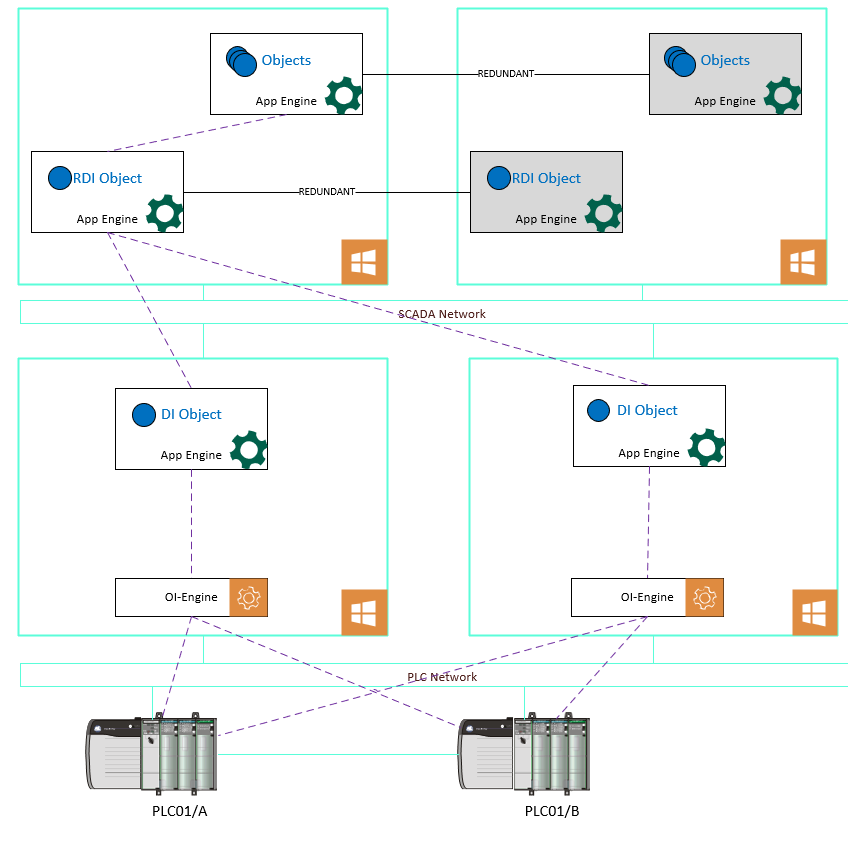
Redundant PLC
Configure both PLC as in stand-alone PLC
Then from Port_CIP object, add redundant object. This will then point to the stand-alone PLC above.
Will require PingItem (usually Watchdog)
Item Naming
| Reference | Syntax |
|---|---|
| ProgramTag | Program:[ProgramName].[TagName] |
| Multi-dimension Array | TagName[X,Y,. . . ] |
| Block R/W of one-dimension array | TagName[X],L# |
| String | TagName[.DATA[[X]][,SC#] |
Siemens
Default SysItem to monitor
| Tagname | Description |
|---|---|
| $SYS$ConnStatus | Connection Status 0 – Disconnected 1 – Connecting 2 – Connected |
| $SYS$Load | Rate of item update in thousands over the last 15 minutes |
| $SYS$ReadCountFailed | Cumulated count of failed read requests to PLC |
| $SYS$HostName | Configured IP address or host name of PLC |
| $SYS$PLCType | PLC Model Number |
| $SYS$ResetStatistics | Reset statistics of OI server |
| $SYS$SyncDB | Force upate of controller tag DB to OI server |
Communication driver is optimized for communication with S7-1500 series of controller.
Communication type available in OI.SIDirect:
- Legacy
- Symbolic
Legacy communication
For using legacy, PUT/GET communication must be enabled and Optimized block access must be disabled
System Requirements
1GB RAM or more required as default.
Additional resources
For every additional 5 connections (up to 10k I/O @ 1000msec each), add 1GB RAM and 1 core
Configurable Parameter
Local TSAP and Remote TSAP
Local and remote TSAP must be different if the same PC is connecting to the same PLC.
Avoid using 0x0100-0xDF** in local TSAP configuration.
Redundant PLC
Two identical devices are expected to be configured (except the IP address), in the OI server manager having identical item syntax, connected to the same OI server.
Put watchdog (e.g. MW0) in Item List on both primary and secondary controller object.
Create new redundant object and point to the existing 2 controller object. use the watchdog as PingItem
New tag
Items cannot be added to RDI if the items do not exist in both controllers
Redundant DI Object
AVEVA Link
More information at Knowledge and Support Center (aveva.com)
Advanced Communication
Remember to enable ACM from Galaxy configuration before platform deployment
DI Object
Host DI object on non-redundant-configured Engine. This engine only contain single DI object for better performance
DI engine to point to single (preferably localhost) OI server for connection
RDI Object
Host RDI object on redundant-configured Engine.
Engine hosting RDI object is best to not contain any object. In case of re-deployment, no object will require redeployment.
Advantage of RDI Object
RDI object will maintain “subscription” to each OI server. Thus, failover speed will be very fast (in case of OI server issue).